
- Understand the difference between admins, moderators, and members
Community Guidelines & Moderation
Set clear rules, manage behavior, and maintain a positive environment.
To set rules for your community you must set the categories tabs for your community posts → go to ‘Categories’ Add the category title and name for Admin posts, this where Administrators can only make announcements and set the rules and guidelines of their community members. You can also do the same for members of your community.
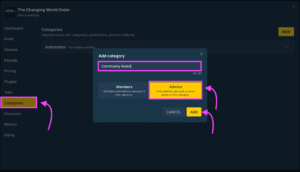
Creating Categories to make content easy to find.
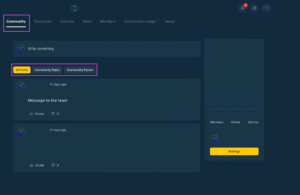
After you have added your categories go to the Community tab and you will see the categories that you created for that community.
 English
  Portuguese
  Spanish